How many glasses? How many points?
Set your daily water target — maybe 8 glasses, maybe 10, whatever works for you. Then configure how many points each glass earns, the bonus for hitting your goal, and the penalty for a zero-water day. The scoring turns hydration from something you forget into something you notice.
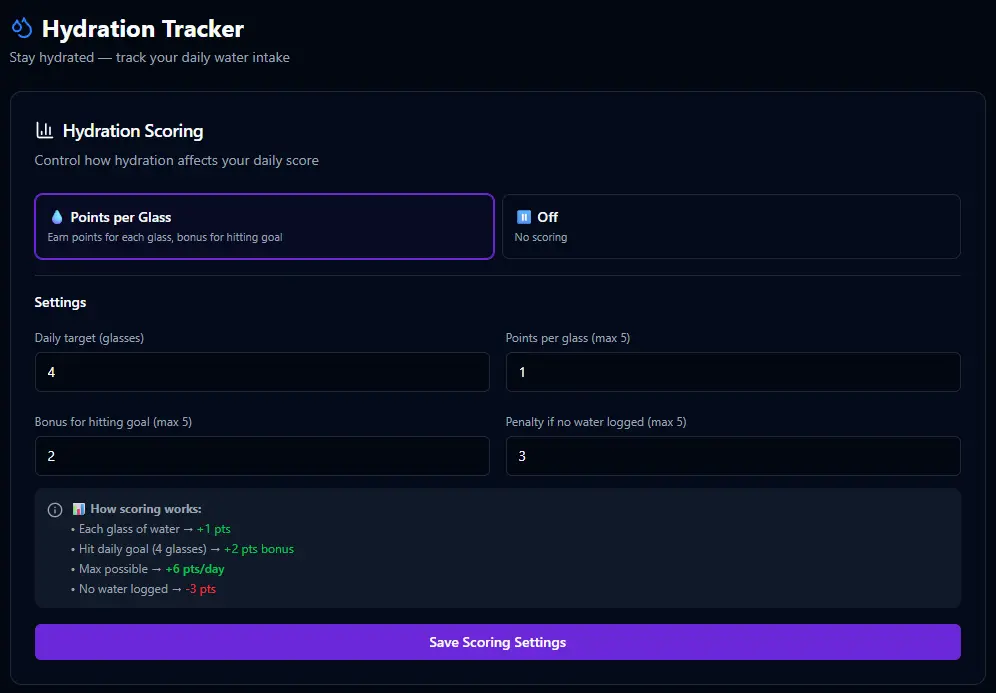
📊 How hydration scoring works
Points per glass — each glass you drink earns points throughout the day. Hit your daily target and you get a bonus on top. Drink nothing and the penalty hits at midnight. It's straightforward by design — the simpler the tracking, the more likely you'll actually do it.
✓ Each glass → +1 pt
✓ Hit 8 glasses → +3 bonus
✗ Zero glasses → −3 pts
Tap a glass. That's it.
The hydration card on your dashboard shows how many glasses you've had versus your target. Log a glass and the count goes up, the points add to your score, and you can see exactly where you stand. It's the fastest interaction in BitHustle — one tap, done.


Say "I had 3 glasses of water" and Bit logs them. Or just "water" and Bit adds one glass. It's the kind of thing that's easier to say than to tap.
Enable it when you're ready.
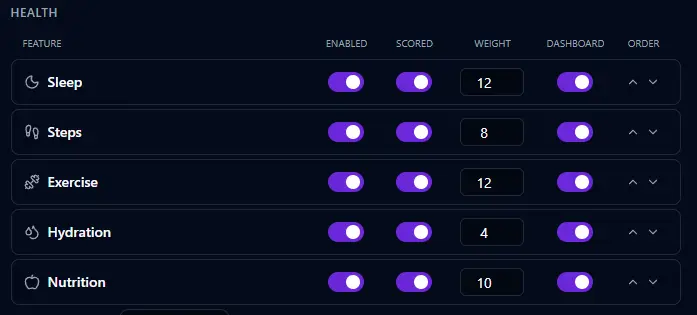
Like every health feature in BitHustle, hydration starts turned off. Enable it in Settings, choose whether it's scored, set the weight, and toggle dashboard visibility. Or tell Bit — "I want to track my water intake" — and it's done.