Add your meds. Set the schedule.
Add each medication with its name, dosage, and the time slots when it needs to be taken — morning, afternoon, evening, or night. You can set preferred times for each slot so Bit knows exactly when to expect you to take them. Configure the points earned for each dose taken and the penalty for doses missed. The schedule becomes your accountability system.
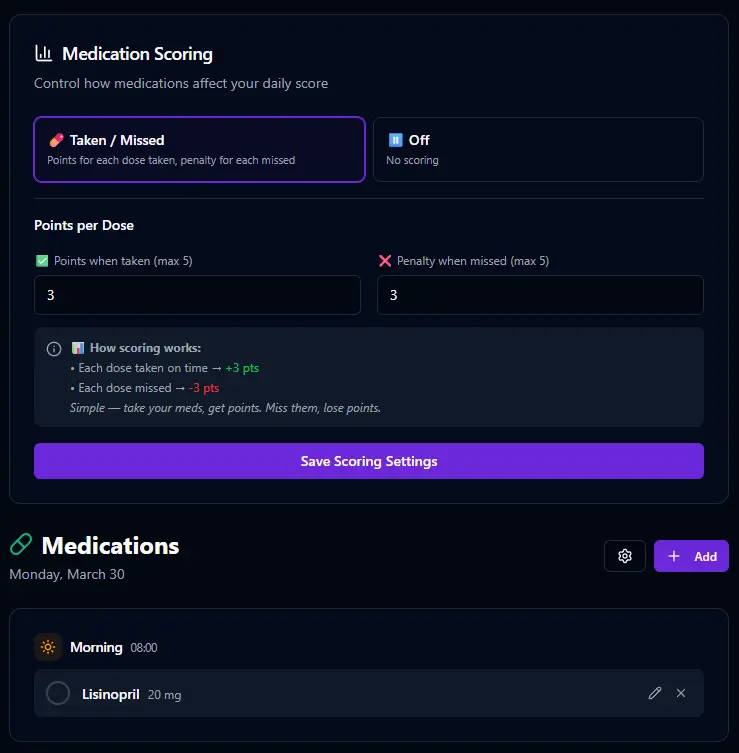
This is where BitHustle goes beyond a simple checklist. Because Bit knows your medication schedule, it can send you a nudge when a dose window is closing and you haven't checked it off yet. A morning medication that's still unchecked by noon? Bit notices. It's not nagging — it's the safety net that a pill organizer can't provide.
Check it off. Four slots. Every day.
The medication card on your dashboard shows each time slot with a checkbox. As you take each dose, check it off and the points add to your daily score. At a glance, you can see exactly where you stand — what's been taken and what's still waiting.


Each dose you take earns points. Each dose you miss costs you. At midnight, Bit closes out the day and your medication compliance is scored into your daily number. Over time, the trend line shows whether you're staying consistent or slipping. For medications where consistency matters most, the score keeps you honest.
Enable it when you need it.
Like every health feature in BitHustle, medication tracking starts turned off. In Settings, you enable it, choose whether it's scored, set the weight it carries in your daily number, and decide if it appears on your dashboard. Not everyone takes medication — but for those who do, this feature turns a daily routine into a system that watches your back.
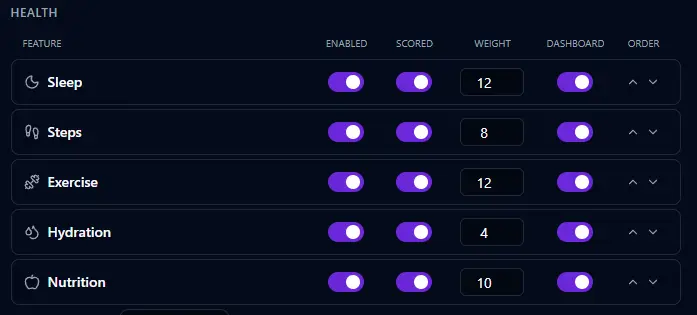
Tell Bit "I need to track my medications" and it enables the feature and walks you through adding your first medication. You don't need to find the settings page — Bit handles the setup conversationally.