Log last night. See the trend.
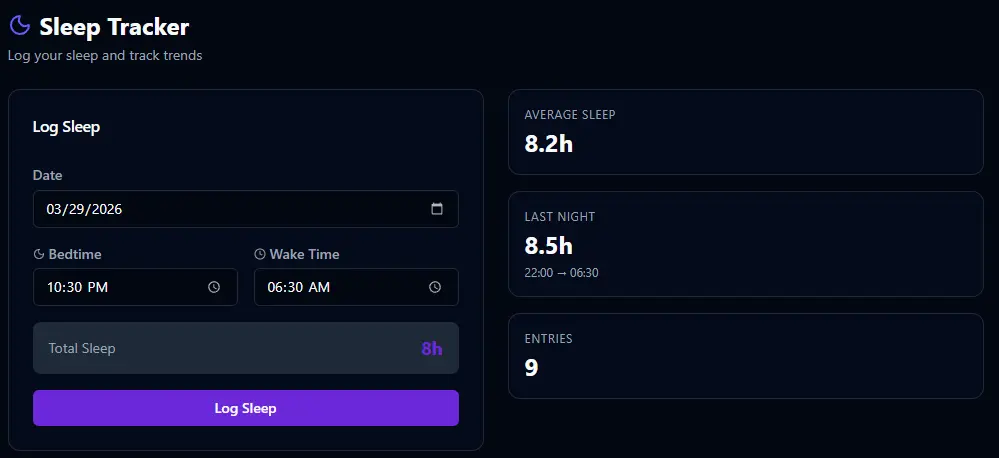
The Sleep page is where you record last night's sleep and see your history at a glance. Enter your bedtime, wake time, and the total hours are calculated automatically. Your average sleep, last night's entry, total entries, and a history chart are all right there — so you can see whether your sleep habits are improving or slipping.
Two dimensions. Your targets.
Sleep scoring in BitHustle evaluates two things: did you go to bed on time, and did you get enough sleep. Both are fully configurable. You set your target bedtime, how much grace period you want, the ideal sleep range, and how many points each component is worth. The scoring engine combines them into your daily sleep score.
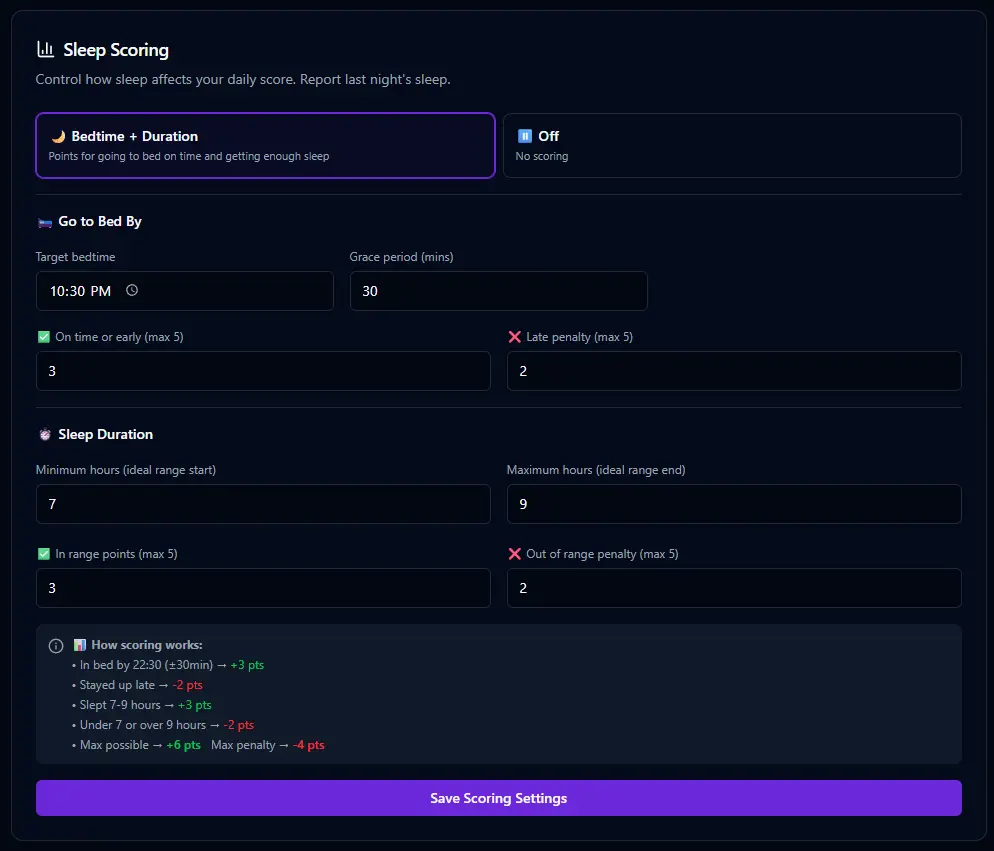
📊 How sleep scoring works
🌙 Bedtime Consistency
Set a target bedtime and a grace period in minutes. Get in bed within the window and you earn points. Stay up late and you lose them. Consistency matters — your body's internal clock rewards routine.
✓ On time or early → +3 pts
✗ Stayed up late → −2 pts
⏱️ Sleep Duration
Set your ideal range — minimum and maximum hours. Sleep within the range and you score. Too little or too much and the penalty hits. You define what "enough" means for your body.
✓ In range → +3 pts
✗ Under 7 or over 9 → −2 pts
Night owl who goes to bed at 1am? Set your target bedtime there. Need 9 hours to function? Set 9 as your minimum. Early riser who runs on 6? Set 5.5–7 as your range. The scoring engine works for your body, not someone else's sleep advice.
Enable it. Score it. Show it.
Like every feature in BitHustle, sleep tracking starts turned off. In Settings, you flip it on and decide three things: should it be scored (does it count toward your daily number), what weight should it carry relative to your other dimensions, and should it appear on your dashboard. Or just tell Bit — "I want to track my sleep" — and it handles the setup for you.

Yesterday's sleep. Today's score.
Once sleep tracking is enabled and set to appear on the dashboard, you'll see a sleep card every day showing what you logged. The bedtime, wake time, and total hours are visible at a glance. Log it in the morning, and the points roll into your daily score immediately. Or tell Bit — "I went to bed at 10:30 and woke up at 6:30" — and it logs it for you.
